

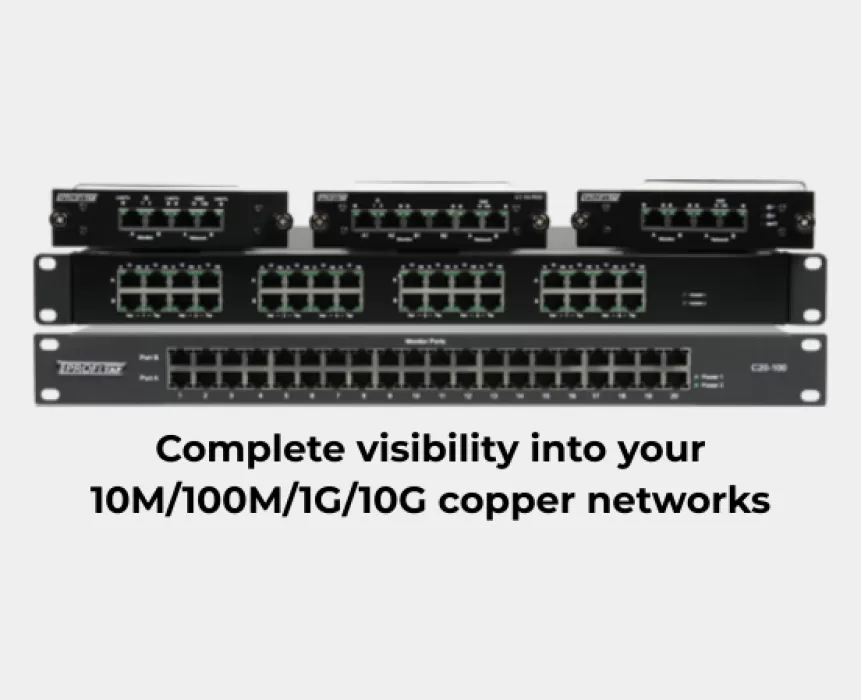
Modern businesses depend on reliable network connectivity to support applications, cloud services, data centers, and daily operations. As network traffic increases, IT teams need effective ways to monitor communications, identify performance issues, and maintain network security without disrupting normal operations.
Copper Network TAPs (Test Access Points) provide a practical solution by creating a copy of network traffic for monitoring and analysis. They allow network engineers and security teams to access Ethernet traffic while keeping monitoring activities separate from the original data flow.
For organizations using copper Ethernet connections, Copper TAPs can help improve network visibility, simplify troubleshooting, and support more effective monitoring strategies.
What Is a Copper Network TAP?
A Copper Network TAP is a hardware device installed inline between two network devices, such as a switch and a server, to provide access to network traffic.
The TAP copies the data passing through the network link and forwards it to connected monitoring tools. These tools can include network analyzers, packet capture systems, intrusion detection systems (IDS), and other security monitoring platforms.
Unlike solutions that rely entirely on switch configuration, a dedicated network TAP provides a separate monitoring access point. This can be particularly useful when consistent visibility into a critical Ethernet link is required.
Copper TAPs commonly support RJ45 Ethernet connections, with available link speeds and monitoring capabilities depending on the model.
How Does a Copper Network TAP Work?
A Copper TAP is typically deployed between two communicating network devices. Once installed and configured, it provides copied traffic to a monitoring system without requiring the monitoring tool to sit directly in the production traffic path.
The basic workflow is:
-
Network connection: The Copper TAP connects inline between two Ethernet devices.
-
Traffic copying: The TAP creates copies of the traffic flowing across the monitored link.
-
Traffic forwarding: The copied packets are delivered to the designated monitoring output or outputs.
-
Traffic analysis: Monitoring tools inspect the copied traffic to identify performance issues, suspicious activity, and communication errors.
For example, a network engineer can install a Copper TAP between a switch and a server. A packet analyzer connected to the TAP's monitoring output can then inspect the available traffic while the server continues its normal network operations.
Actual traffic visibility depends on the TAP's architecture, supported link speed, output configuration, and monitoring equipment.
Key Benefits of Copper Network TAPs
1. Improved Network Visibility
Copper TAPs provide monitoring tools with access to copied network traffic. This helps IT teams investigate communication patterns, analyze packets, and gain better visibility into network activity.
2. Simplified Network Troubleshooting
When users experience slow applications, connectivity problems, or intermittent communication failures, packet-level analysis can help identify potential causes. Copper TAPs provide a dedicated access point for collecting the traffic needed during troubleshooting.
3. Support for Network Security Monitoring
Security monitoring tools can analyze copied traffic to help identify suspicious communications, policy violations, and other potential threats. A Copper TAP can support IDS and other passive monitoring deployments, depending on the monitoring platform and traffic visibility requirements.
A TAP itself does not detect or block threats; those functions depend on the connected security tools.
4. Monitoring Without Relying Solely on SPAN Configuration
Switch SPAN or port mirroring can provide traffic copies for monitoring, but its capabilities and limitations depend on the switch and configuration. A dedicated Copper TAP offers an alternative for obtaining traffic from a specific physical link.
The appropriate choice depends on traffic volume, monitoring requirements, infrastructure, and budget.
5. Support for Reliable Monitoring Deployments
Some Copper TAP models include fail-safe or fail-open designs intended to help maintain network connectivity during a power failure. This capability is model-specific and should be verified before deployment.
Selecting the right hardware for the network environment helps ensure that monitoring requirements and operational needs are both addressed.
Copper TAP vs. SPAN Port: What is the Difference?
Copper TAPs and SPAN ports both provide access to network traffic, but they work differently
.png) A Copper TAP may be preferable when dedicated access to a physical Ethernet link is required. A SPAN port may be sufficient for basic troubleshooting or deployments where switch-based mirroring meets the requirements.
A Copper TAP may be preferable when dedicated access to a physical Ethernet link is required. A SPAN port may be sufficient for basic troubleshooting or deployments where switch-based mirroring meets the requirements.
The decision should be based on the monitoring objective, required traffic fidelity, infrastructure, and total deployment cost.
Common Applications of Copper Network TAPs
Copper TAPs can support a range of enterprise networking and monitoring use cases.
-
Enterprise network monitoring: Gain access to traffic flowing between switches, servers, and other Ethernet-connected devices.
-
Data center monitoring: Provide traffic copies for analysis of selected copper Ethernet links, subject to supported speeds and port configurations.
-
Cybersecurity monitoring: Supply copied traffic to compatible intrusion detection and network security monitoring tools.
-
Network performance analysis: Help engineers investigate packet-level issues, connectivity problems, and unexpected network behavior.
-
IT infrastructure troubleshooting: Assist with diagnosing communication issues across supported copper Ethernet connections.
The suitability of a Copper TAP for any particular application depends on its specifications and compatibility with the network and monitoring equipment.
How to Choose the Right Copper Network TAP
Before selecting a Copper TAP, evaluate the following factors to ensure that the device meets your network's requirements.
-
Ethernet speed: Confirm that the TAP supports the required link speed, such as 1G or 10G, where available.
-
Port connectivity: Check the supported copper interface, including RJ45 connectivity where required.
-
Traffic direction: Determine whether you need visibility into one direction or both directions of a full-duplex link.
-
Monitoring outputs: Verify the number and type of monitoring ports and how traffic is distributed to connected tools.
-
Traffic handling capacity: Ensure the monitoring output can handle the expected traffic volume without unacceptable packet loss.
-
Fail-safe design: Check whether the model supports fail-open or fail-safe operation and understand its behavior during power loss.
-
Tool compatibility: Confirm that the TAP works with your packet analyzer, monitoring appliance, or security platform.
-
Deployment requirements: Consider power, installation, cabling, and the operational importance of the monitored link.
Choosing a Copper TAP based on these factors can help organizations establish a monitoring setup suited to their technical and operational needs.
Why Choose Khushi Communications for Copper TAP Solutions?
Khushi Communications supports businesses and network professionals looking for network visibility and testing solutions. Selecting the right Copper TAP starts with understanding the existing Ethernet infrastructure, monitoring objectives, and technical requirements.
Whether you are planning a network monitoring deployment, evaluating packet capture options, or upgrading an existing monitoring setup, reviewing the appropriate Copper TAP specifications can help you identify a suitable solution.
Explore the available options on the Copper TAPs product page to learn more about the solutions offered by Khushi Communications.
Looking for a Copper Network TAP for your infrastructure? Visit Khushi Communications' Copper TAPs page to explore available solutions and contact the team for product specifications and quotation assistance.
 Whatsapp Us